
SEO Programming: What Developers Need to Know to Make Sites Rankable
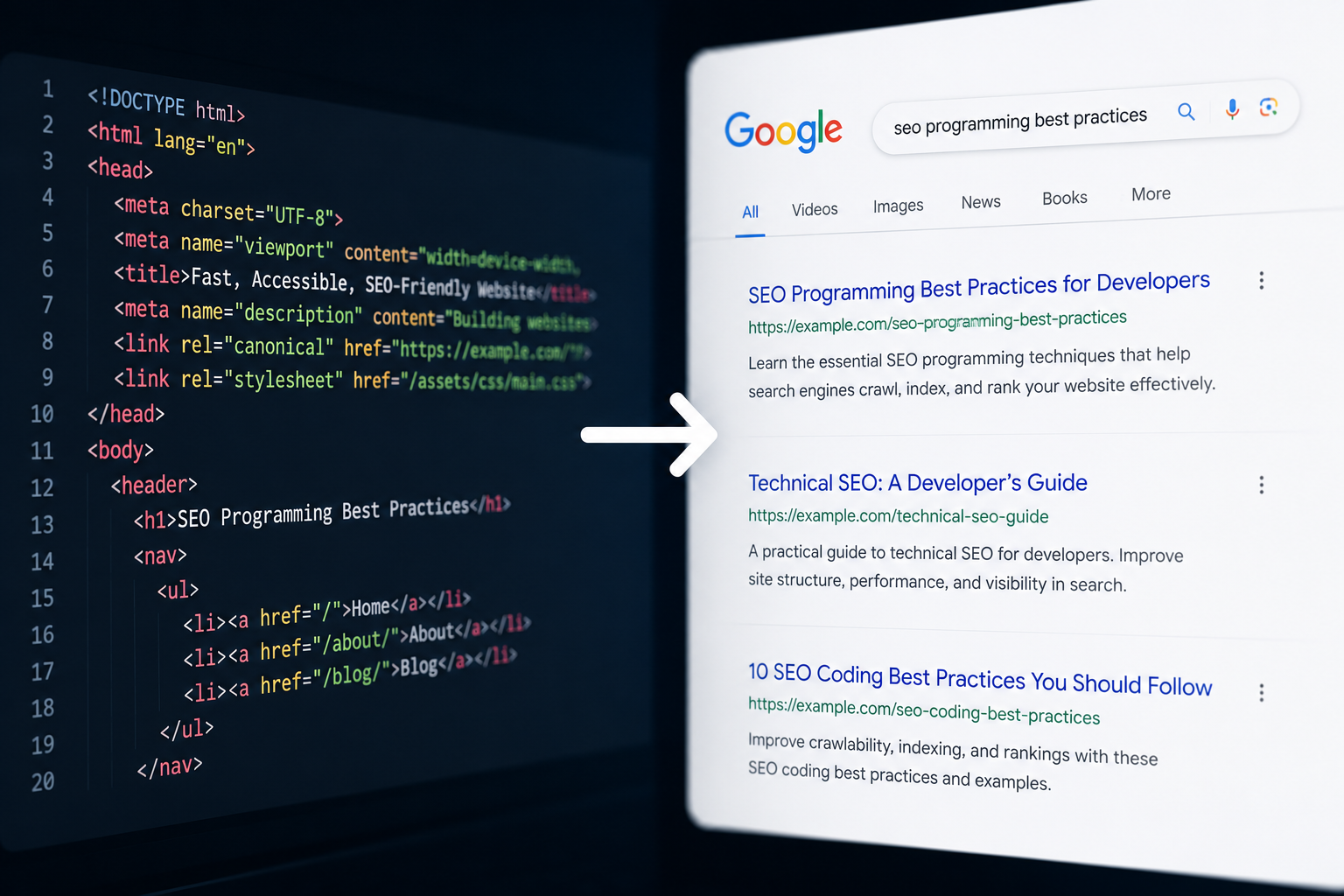
A developer can ship a technically flawless site, fast, clean, and fully functional, and still watch it rank nowhere, while a poorly coded blog with thin content pulls in steady traffic. The difference usually isn’t content quality alone. It’s whether the code itself lets search engines and, increasingly, AI answer engines actually read and understand what’s on the page.
This guide covers SEO programming from a developer’s perspective, the technical decisions in code and architecture that determine whether a site can rank at all, before content or marketing even enter the picture.
Who this guide is for: developers building sites without a dedicated SEO specialist, technical leads wanting to avoid common crawlability mistakes, and marketers needing to communicate technical requirements clearly to a dev team.
Last verified: July 2026.
Quick Answer
SEO programming refers to the technical, code-level practices that make a website crawlable, fast, and understandable to search engines: clean semantic HTML, proper handling of JavaScript-rendered content, fast load times, mobile-responsive design, and structured data. Without these fundamentals in place, even strong content struggles to rank.
How We Chose These Areas
Every area here was evaluated against the same criteria, so the guide reflects genuine technical impact rather than a generic SEO checklist.
- Direct, well-documented influence on crawlability or ranking
- Common mistakes developers specifically make, not just marketers
- Practical implementation detail, not just naming the concept
- Relevance to both traditional search engines and newer AI answer engines
Core Technical SEO Areas Developers Control
| Area | Why It Matters | Common Developer Mistake |
| Semantic HTML | Helps crawlers understand page structure and content hierarchy | Using generic divs instead of header, article, and nav tags |
| JavaScript rendering | Determines whether crawlers can see dynamically loaded content | Relying entirely on client-side rendering without SSR fallback |
| Site speed | A confirmed ranking factor and user experience signal | Unoptimized images and unnecessarily large JavaScript bundles |
| Mobile responsiveness | Google indexes the mobile version of a site first | Layouts that break or hide content on smaller screens |
| Structured data | Helps search engines and AI tools understand specific content types | Missing or incorrectly implemented schema markup |
| URL structure | Affects both crawlability and how links get shared | Deeply nested or dynamically generated unreadable URLs |
SEO Programming by Priority
- Fix first if broken: JavaScript rendering issues, since they can make entire pages invisible to crawlers
- Biggest ongoing impact: site speed and Core Web Vitals
- Easiest quick win: semantic HTML and proper heading structure
- Most overlooked in 2026: structuring content for AI answer engine citability, not just traditional search rankings
Implementation Roadmap by Time Available
| Time Available | Focus On |
| One day | Fix broken JavaScript rendering, resolve broken redirects, check robots.txt for accidental blocks |
| One week | Improve Core Web Vitals, clean up semantic HTML, add core structured data |
| One month | Refine site architecture and internal linking, restructure key pages for AI-friendly answer extraction |
Actual timelines depend heavily on site size and existing technical debt, so treat this as a general prioritization guide rather than a fixed schedule.
Clean, Semantic HTML
Best for: giving search engines a clear structural map of your content without extra effort.
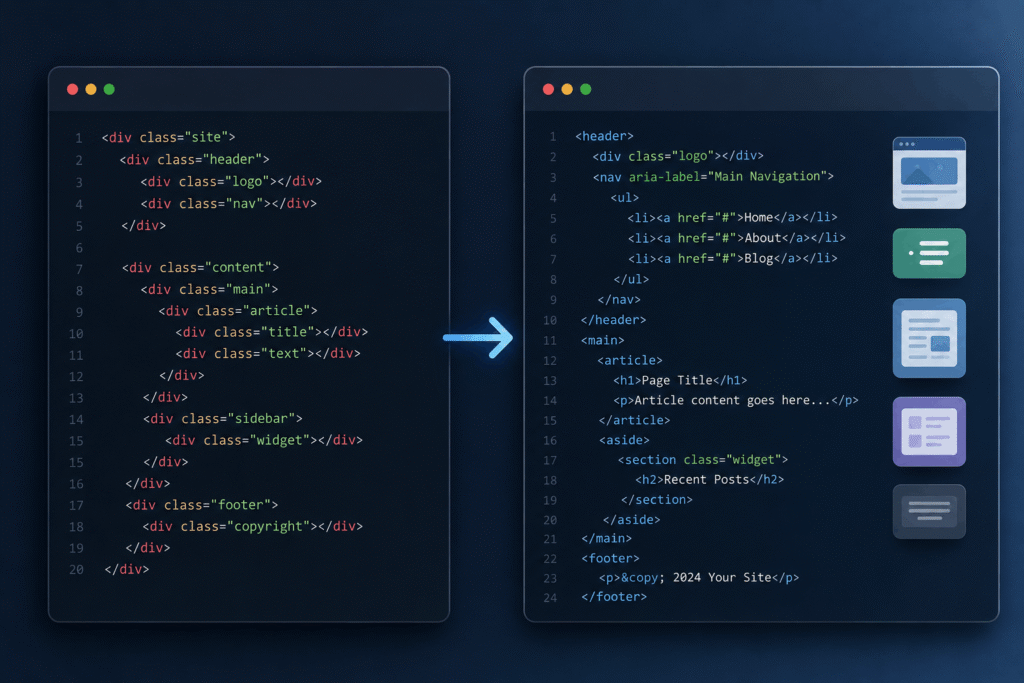
What it involves: using HTML elements for their intended purpose, header, nav, article, section, and footer, rather than generic div and span tags for everything.
Why it matters: semantic tags give crawlers context about what a piece of content actually is, a main article versus a sidebar versus navigation, which plain divs don’t communicate on their own.
Who should prioritize this most: teams building with component libraries or design systems, since it’s easy for semantic structure to get lost inside deeply nested custom components.
Practical tip: running your pages through an HTML validator catches structural errors that are often invisible visually but still confuse crawlers, especially on templated pages where the same error repeats across every instance.
JavaScript Rendering and Single-Page Apps
Best for: any team building with React, Vue, Angular, or a similar framework.
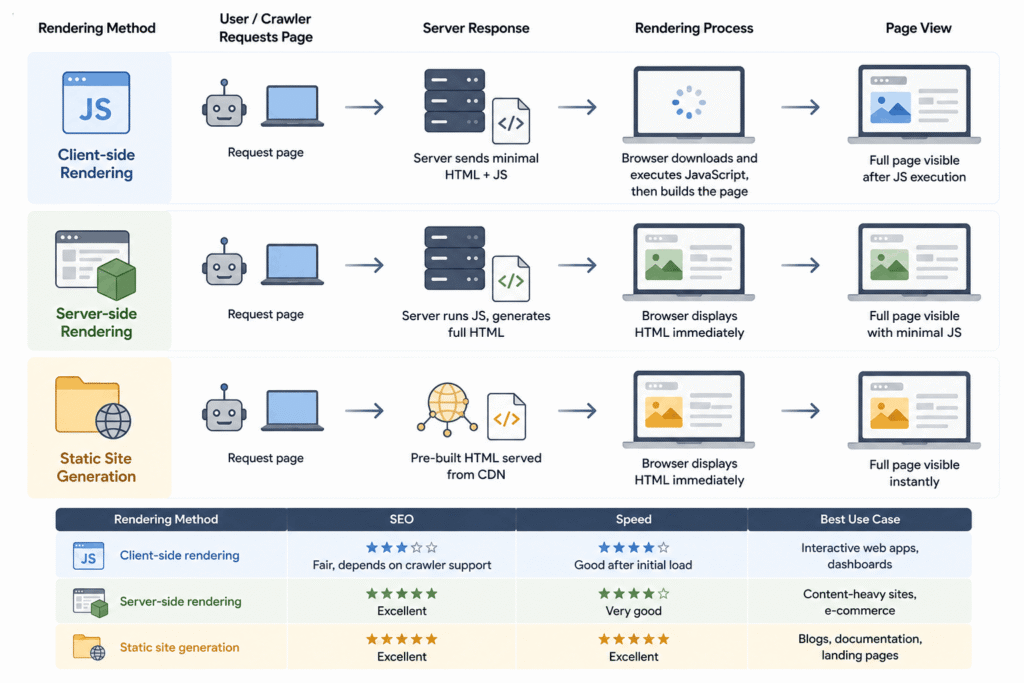
What it involves: ensuring that content isn’t hidden behind client-side JavaScript rendering that crawlers may not fully execute, particularly for anything you need indexed quickly.
Why it matters: modern search engine crawlers can render JavaScript, but not always reliably or quickly, and other crawlers, including some used by AI answer engines, have more limited JavaScript rendering capability. A page that looks complete in a browser can appear nearly empty to a crawler that didn’t fully execute the script.
Who should skip worrying about this: teams using server-side rendering or static site generation by default, since the content is already present in the initial HTML response rather than depending on client-side execution.
Practical tip: viewing your page’s rendered HTML through a crawler simulation tool, rather than just your browser’s dev tools, reveals whether critical content is actually present in what a crawler receives.
| Rendering Method | SEO | Speed | Best Use Case |
| Client-side rendering | Fair, depends on crawler support | Good after initial load | Interactive web apps, dashboards |
| Server-side rendering | Excellent | Very good | Content-heavy sites, e-commerce |
| Static site generation | Excellent | Excellent | Blogs, documentation, landing pages |
Site Speed and Core Web Vitals
Best for: improving both ranking signals and actual user experience simultaneously.
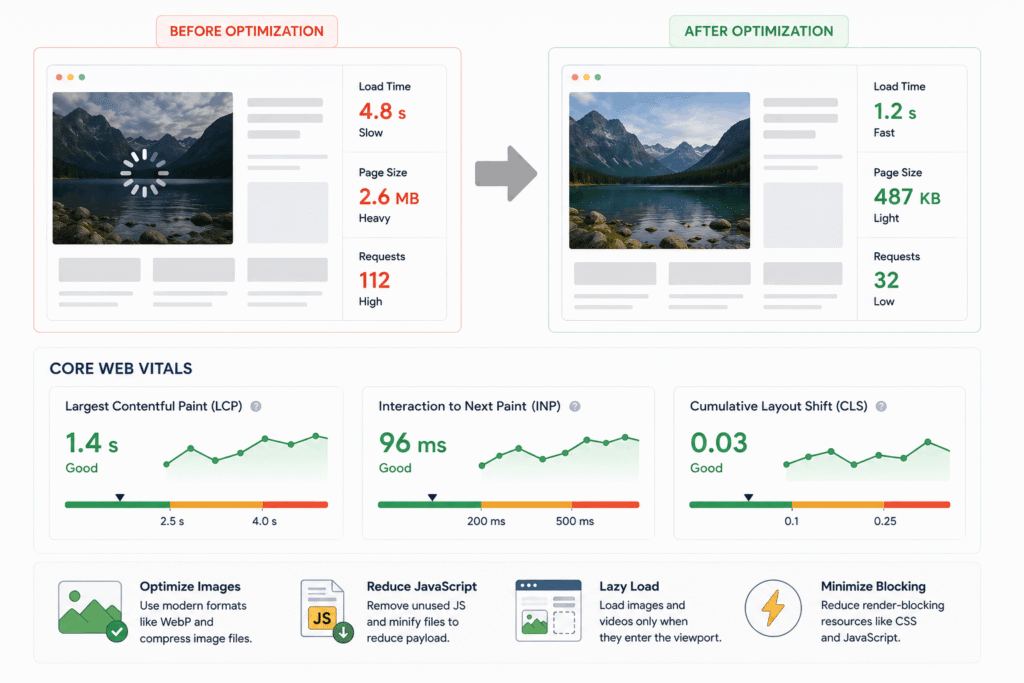
What it involves: optimizing image sizes and formats, reducing unnecessary JavaScript, lazy loading non-critical content, and minimizing render-blocking resources.
Why it matters: Google has confirmed page experience metrics, including loading speed and visual stability, as ranking factors, and slow sites also see higher bounce rates regardless of ranking position. Core Web Vitals primarily measure loading performance (Largest Contentful Paint, or LCP), responsiveness (Interaction to Next Paint, or INP), and visual stability (Cumulative Layout Shift, or CLS).
Who should prioritize this most: teams shipping image-heavy or JavaScript-heavy sites, since these are usually the biggest contributors to slow load times.
Practical tip: modern image formats like WebP, combined with proper lazy loading for below-the-fold images, often produce the largest speed improvement for the least development effort.
Mobile-First and Responsive Design

Best for: ensuring your site performs well under Google’s mobile-first indexing approach.
What it involves: building layouts that adapt properly across screen sizes, rather than a desktop-first design with mobile treated as an afterthought.
Why it matters: search engines primarily index and rank based on a site’s mobile version, so content or functionality that breaks or disappears on smaller screens can directly hurt rankings, not just mobile user experience.
Who should skip extensive extra work here: teams already using a modern, mobile-first responsive framework by default, since much of this is handled structurally rather than needing separate mobile-specific development.
Practical tip: testing on actual mid-range mobile devices, not just a desktop browser’s responsive mode, catches real-world performance issues that emulators sometimes miss.
Structured Data and Schema Markup
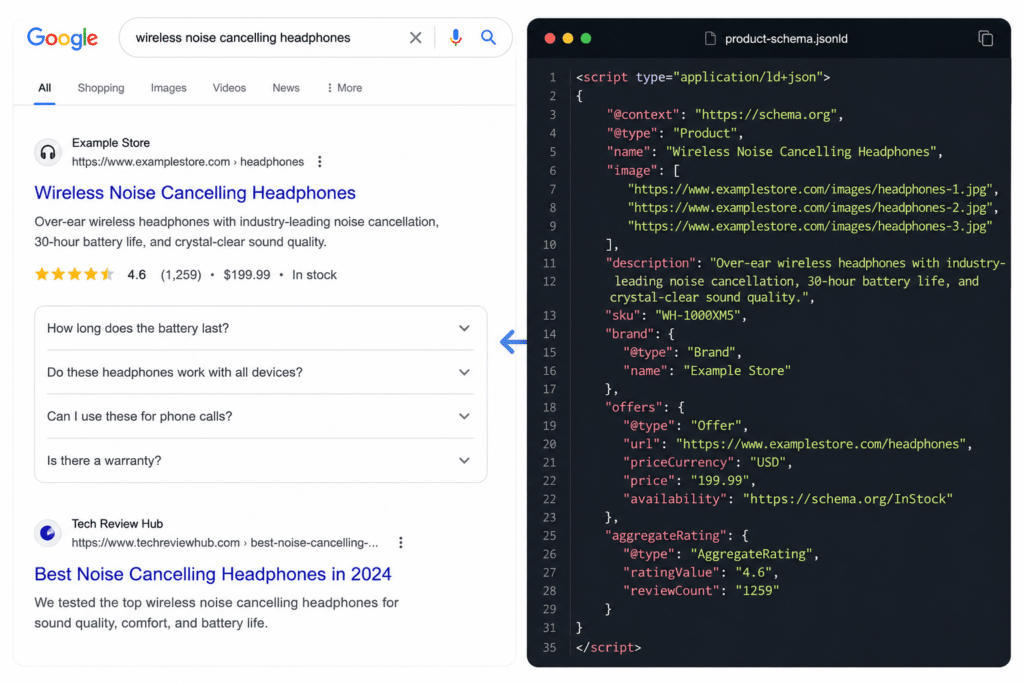
Best for: helping search engines and AI tools understand specific content types, like products, articles, or FAQs, beyond plain text.
What it involves: adding structured data markup, commonly in JSON-LD format, that explicitly labels content types and their properties.
Why it matters: structured data can enable rich results in search, like star ratings or FAQ dropdowns, and increasingly helps AI answer engines extract specific facts accurately rather than guessing from unstructured text.
Who should skip this initially: very small, simple sites without product listings, reviews, events, or FAQ-style content, since the benefit scales with how much structured content you actually have to mark up.
Practical tip: validating structured data with an official testing tool before deployment catches formatting errors that would otherwise silently prevent the markup from being recognized at all.
URL Structure and Site Architecture
Best for: making both crawling and link sharing more effective.
What it involves: using short, readable, logically organized URLs, and maintaining a clear site hierarchy that reflects how content relates to itself.
Why it matters: a clean URL structure makes it easier for crawlers to understand site organization, and readable URLs are more likely to be trusted and clicked by actual users.
Who should prioritize this most: teams migrating an existing site or restructuring navigation, since URL changes without proper redirects can cause real ranking losses.
Practical tip: setting up 301 redirects for any changed URL, rather than allowing old links to simply 404, preserves both existing rankings and any external links already pointing to that content.
Structuring Content for AI Answer Engines
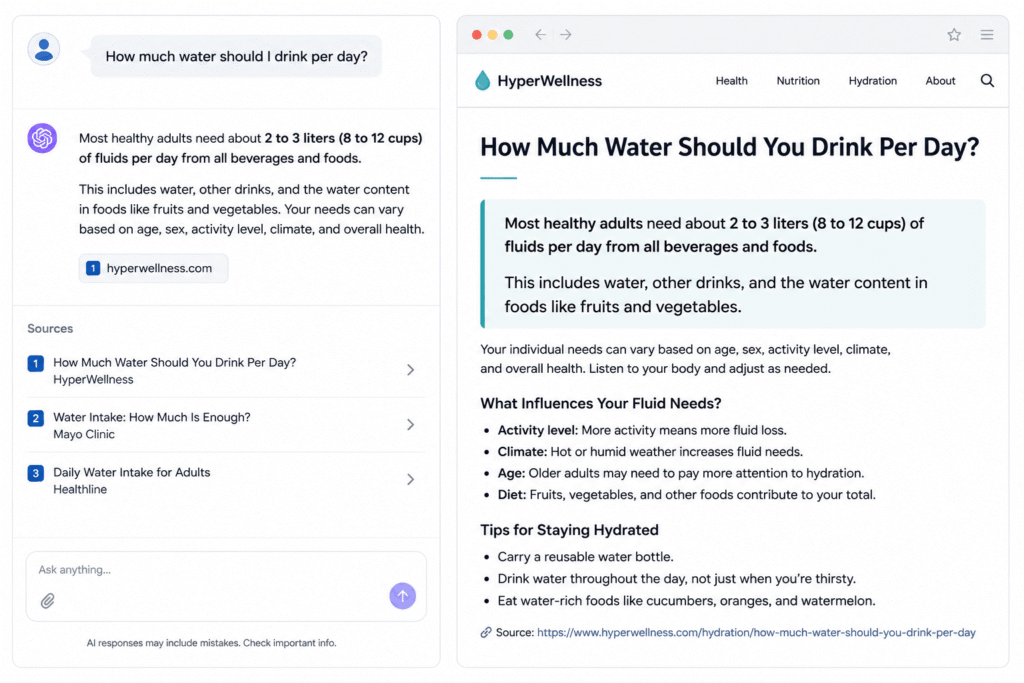
Best for: teams wanting visibility in AI Overviews, ChatGPT Search, and Perplexity, not just traditional search rankings.
What it involves: structuring content so that a specific, clear answer sits near the top of a page, in a format that’s easy to extract and quote directly, rather than requiring an AI system to interpret a long, unstructured paragraph.
Why it matters: In 2026, ranking highly in traditional search no longer guarantees visibility, since AI answer engines can pull a citation from a lower-ranked page if that page states the answer more clearly and extractably.
Who should prioritize this most: teams in industries where users increasingly ask AI tools directly rather than clicking through search results, since traditional ranking position matters less if the AI answer engine cites a competitor instead.
Practical tip: answering the core question directly within the first few sentences of a section, before adding supporting detail, tends to perform better for both featured snippets and AI citation than burying the answer deeper in the text.
Common Mistakes in SEO Programming
- Assuming a fast browser experience means fast crawling: cached assets and a warm browser can hide real-world load times crawlers actually experience.
- Treating JavaScript rendering as fully solved by default: even capable crawlers don’t always render every script reliably or quickly.
- Skipping redirects during a site migration: broken links from an old URL structure can cause avoidable ranking drops.
- Adding structured data without validating it: invalid markup often fails silently, providing no benefit despite the added development effort.
- Ignoring AI answer engine citability entirely: optimizing only for traditional blue-link rankings misses a growing share of how people now find information.
Frequently Asked Questions
What is SEO programming?
SEO programming refers to the technical, code-level practices, clean semantic HTML, proper JavaScript rendering, site speed, mobile responsiveness, and structured data that determine whether a website is crawlable and understandable to search engines.
Do developers need to know SEO?
Increasingly, yes. Many of the most damaging SEO problems, like JavaScript content invisible to crawlers or broken redirects during a migration, are technical issues that only a developer can properly fix.
Does JavaScript hurt SEO?
Not inherently, but JavaScript-rendered content that isn’t handled with server-side rendering or proper fallbacks can be missed or delayed by crawlers, effectively making that content invisible for ranking purposes.
What is the most important technical SEO factor for developers?
There’s no single most important factor, but JavaScript rendering issues tend to cause the most severe problems, since they can make entire sections of content invisible to crawlers rather than just less optimized.
How does SEO programming relate to AI search tools like ChatGPT?
AI answer engines pull citations from pages that state information clearly and extractably, so structuring content with direct answers near the top of a section increasingly matters alongside traditional search ranking factors.
Final Recommendation
If you’re starting from scratch, prioritize server-side rendering or static generation over client-side-only JavaScript, since rendering issues cause the most severe ranking problems. If your site is already built, audit your JavaScript-heavy pages first, then move to site speed and structured data. If you’re optimizing for the newest search behaviour, restructure key pages so a clear answer sits near the top, not just buried in a longer explanation.
Conclusion
SEO programming is the technical foundation that determines whether great content ever gets the chance to rank at all. Clean semantic HTML, properly rendered JavaScript, fast load times, and structured data aren’t separate from SEO strategy; they’re the infrastructure it depends on. If you’re also thinking about how technical decisions connect to broader business strategy, our explainer on the marketing concept covers the customer-first thinking that should guide which pages and content get this level of technical priority in the first place.
Sources
- Google Search Central, official documentation on crawling, indexing, and technical SEO
- web.dev, official Google resource on Core Web Vitals and page performance
- Schema.org, official structured data vocabulary and implementation reference